Don't miss even a single update! Like/Join us on Facebook to keep up-to-date!

Categories...

Kedai Membaiki Komputer

Kedai Membaiki Komputer
Dipercayai, Berkualiti & Pengurusan Mudah!
Showing posts with label Technology. Show all posts

Tuesday, 16 June 2015

How To Create Typography Illustrations the Easy Way

Read the article
Hand lettering typography illustrations are really cool, but it takes a lot of skill to craft authentic artworks by hand with pen and paper. Typically this style of art is created by elite illustrators, but I’ve found an entirely digital technique that allows us mere mortals to create cool looking artwork too! Follow this step by step Illustrator tutorial to learn how to manipulate text within a silhouette shape and add texturing to produce a realistic hand drawn style typography illustration.

Hand lettering style typography illustration
After releasing last week’s free meat cut illustrations I received a few enquiries from people asking how they were made, so today’s tutorial is based on the same technique. We’ll be creating a trendy hand lettering style quote illustration, except with this method there’s no hand lettering required! Usually this artwork would be carefully hand drawn and scanned, but instead we’re going to cheat and use digital techniques to safely tweak the text until we’re happy then fake that analogue look with textures.

The quote I’ve chosen to depict in this typography illustration is “Give Me a Home Where the Buffalo Roam” from the classic Home on the Range song, so an image of an actual buffalo suits this quote perfectly. I’m using this public domain image as a reference. Paste in your reference image and reduce the opacity to around 50%.

Select the Pen tool and begin tracing a rough outline around the subject. Accuracy isn’t too important because we’re trying to replicate a hand drawn style. Once the path is complete, add a black fill and remove the stroke.

Type out your chosen quote somewhere on the artboard, then scan through your fonts collection for a nice hand drawn style. I’m using a premium font named Daft Brush, but here’s a roundup of loads of free handwriting fonts you can choose from. Create individual text elements for each word of the quote, fill them with white and place them over the silhouette image.

Begin scaling and rotating the text elements to roughly fit them within the silhouette image. Make sure the primary words are made the largest in size so the quote is easily readable.

What our digital design is lacking that those hand lettered example have is the free flowing shapes of the text. The hand lettering illustrators will draw the words to match required shape, but it takes some skill to plot the letters so they fit perfectly. Instead we can use the Envelope Distort tool to manipulate and tweak the shape of our text until we’re happy. Select the first word and go to Object > Envelope Distort > Make with Mesh.

Add just one row but select a number of columns roughly equal to the number of letters in the word. The more columns there are the more the word can be reshaped, which is important for those words that need to fit into complex areas.

Use the Direct Selection tool to select each point of the mesh and move it into place to manipulate the text into the shape of the silhouette outline. Don’t forget to adjust the bezier handles to generate smooth curves.

Shorter words don’t require as many mesh points because they’re smaller in size. Make just 2 columns for a two letter word.

Some words will require some considerable manipulation to distort them into the required shape. Move those mesh points around to stretch the letters, but try to keep each column of the mesh equal in size so the letters are still evenly spaced.

For words on the second line the mesh points will need manipulating on the top and bottom so the word follows the flow between the existing text and the silhouette outline.

Aim to fill as much of the silhouette shape as possible but retain even gaps around the edges and in between each word. The great thing about designing digitally is you can move and tweak the letters until you’re happy. Whereas, whatever you draw by hand is permanent!

One advantage of authentically hand drawn artwork is the natural texturing that is generated from the ink or lead. We’ll need to fake this on our digital artwork. Add an Opacity Mask to the silhouette shape from the slide out menu from the Transparency panel.

The opacity mask will create a black square inside the Transparency panel to represent the mask contents. Select this square to activate the mask, then paste in a texture from my Vector Textures pack. Deselect the Clip option and select the Invert Mask option, then reactivate the normal artwork by clicking the left hand square in the panel.

Make a group out of all the text elements then add a new Opacity Mask and paste in another texture to erase away tiny areas of the text too.

Finishing touches


The vector design is complete, but a few extra steps to mock up the design will really finish it off. Open a complementing photograph in Photoshop and apply one of my RetroFilter Actions to add an interesting colour adjustment.

I’ve chosen the “Molle” Action then reduced the opacity to around 75% to allow some of the original colours to show through.

Paste in the vector artwork from Illustrator and press CMD+I to invert the colours. Change the blending mode to Screen to render the black text transparent and effectively punch out the text from the silhouette.

We’ve already added some vector texturing in Illustrator, but Photoshop allows for much more realistic edits. Create a Layer Mask, ALT-click on the layer mask thumbnail to activate it then paste in a texture file. Here I’m using one of the vintage textures available to Access All Areas members.
Hand lettering style typography illustration
The final design has all the characteristics of authentic hand drawn art, but it didn’t require the perfection and patience that’s necessary with pen and paper. The manipulation of the text also helps disguise the fact that it’s a display font; warping the letters means that no two letters look identical. The greatest benefit of this digital technique though, is that the text can still be edited and the new wording will automatically form to the existing shapes.

Original Article: http://blog.spoongraphics.co.uk/tutorials/how-to-create-typography-illustrations-the-easy-way

Thursday, 4 June 2015

How to Create a Software RAID Array in Windows 7


Instead of having a bunch of separate drives to deal with, why not put them together into one big drive? You can use software RAID to accomplish this, and here’s how to do it.

Windows has built in functionality to set up a software RAID (Redundant Array of Inexpensive Disks) without any additional tools. This makes it easy to turn your existing spare hard drives into massive storage or even redundant backups. In this example we are going to set up a spanned disk that takes three 2 GB disks and creates one 6 GB disk using Windows 7 Professional.

Set Up Your Disks


The first step you need to do is backup your information on the disks you want to use in the RAID. While it is not required that you format your disks for some of the RAID options, don’t take the chance and make a backup.
Once all of your information is backed up, open your start menu, right click on computer and open manage.

When computer management opens click on disk management on the left side. Any disk you want included in your RAID you need to delete them from the top area of disk management.

Once they are deleted you should only be left with disks you do not want included in the RAID. The other disks will still be there but they will show up in the lower pane and show their spaces as unallocated.

Create Your RAID

In Windows they don’t call their RAID options by the traditional 0, 1, 5, 10 etc. Instead they use spanned, striped, and mirrored as the options for creating software RAIDs.
Note: RAID-5, although one of the options, isn’t actually available in Windows 7 due to licensing issues. Thanks to the commenters for pointing that out.
A spanned volume will create a single partition that will literally span all of the included disks whereas a striped volume will deliberately break up files across multiple disks in an attempt to improve read and write performance. In both cases there is no redundancy so you need to create your own backups.
A mirrored volume and RAID 5 both have some redundancy but you lose storage space to create the parity files needed for recovery. For this example we are going to go with the simplest volume type and create a spanned volume even though it isn’t technically RAID.
Right click on the first disk you want included in your RAID and select new spanned volume.

This will open up the New Spanned Volume Wizard in Windows. Click next and then select which disks you want included in your new volume (a.k.a. software RAID).

Assign the new volume a mount letter or mount point.

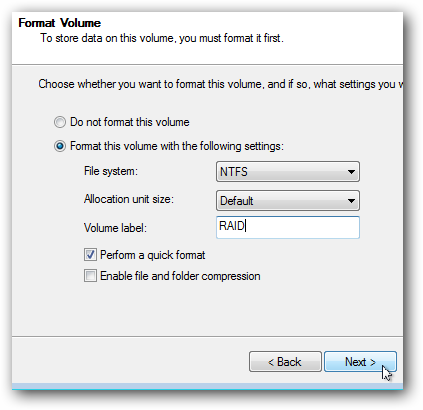
Name and format the volume and click next.

The final step just reviews all of your settings before the disks are formatted and the new volume is mounted.

You should also receive a warning letting you know that if your operating system is on one of these volumes you won’t be able to use it because the volume is now a dynamic volume instead of a logical volume.

Finally the disks will be formatted and once the drive is mounted you should be welcomed with the familiar AutoPlay prompt.

If you browse to Windows explorer you should also see that the new volume has the combined storage space of the three individual disks used to create it.

credited to HowToGeek

Wednesday, 26 November 2014

Tayar TANPA ANGIN Akan Muncul Di Pasaran!


Bridgestone sudah mencipta airless tyre sejak tahun 2011 lagi, namun kali ini syarikat itu mendakwatelah tampil dengan reka bentuk yang lebih baik dan telah mula mempamerkannya di Paris Motor Show.


Tayar ini tidak kelihatan seperti tayar yang kita sering lihat pada hari ini. Ia kelihatan seperti sejenis penapis udara. Maka mungkin akan bermulalah era tayar tanpa udara menggantikan tayar yang kita sering gunakan sebelum ini.


Di dalam
tayar ini terdiri daripada resin yang dapat menyerap tekanan, hentakan, dan daya. Di luarnya pula terdiri daripada getah yang dapat digantikan dengan mudah tanpa perlu menggantikan keseluruhan tayar. Menakjubkan!

Tuesday, 25 November 2014

'Texting' Menyebabkan Kesakitan Pada Tulang Belakang


Seorang pakar bedah
dari New York telah melakukan banyak penyelidikan mengenai perkara ini, dan dia yakin bahawa, dengan tunduk melihat ke bawah ke arah telefon, kita meletakkan kira-kira 60 paun tenaga tambahan pada kepala kita.

Hakikatnya, 
ramai orang menghabiskan masa menghantar teks dari masa ke masa, dan ini benar-benar boleh memberi kesan yang buruk kepada tulang belakang orang-orang tersebut. Jika dibiarkan, ia akhirnya boleh membawa kepada pembedahan tulang belakang, dan lain-lain penyakit lagi.
Nampaknya satu-satunya cara yang "selamat" untuk 'texting' adalah dengan memegang telefon secara selaras, sama tinggi dengan kedudukan muka anda, tanpa menundukkan atau mendongakkan kepala.

Monday, 24 November 2014

Tiga model baru smartphones ACER


Acer Malaysia memperkenal tiga model telefon pintar baharu Acer Liquid X1, Liquid Jade dan Liquid Z500.

Acer Liquid X1 menawarkan prestasi tinggi, peralihan yang lancar dan antara muka yang dijana oleh 'octa-core' 1.7GHz dan pemproses grafik 'quad-core'.

Acer Liquid Jade yang memenangi anugerah sebelum ini, memiliki ciri-ciri yang anggun, sentuhan yang lebih lembut dan reka bentuk melengkung dengan dihiasi bingkai 'bezel'.

Acer Liquid Z500 pula lebih nipis dan selesa untuk dipegang, memiliki pembesar suara hadapan yang amat berkuasa dan Definisi Tinggi (HD), sesuai untuk hiburan.

Kedua-dua, Acer Liquid X1 dan Liquid Jade diperkenalkan awal tahun ini di pameran Computex 2014, Taiwan manakala Acer Liquid Z500 diperkenalkan di Berlin, Jerman ketika IFA 2014.

Acer Liquid X1, Liquid Jade dan Liquid Z500 masing-masing datang dengan tanda harga RM999, RM799 dan RM499, boleh didapati daripada penjual utama Acer di seluruh negara.

Application terbaru dari Facebook : GROUPS


Facebook pada 19 Nov yg lepas melancarkan aplikasi mudah alih percuma baru Groups untuk meningkatkan kemudahan penggunaan bagi ciri popularnya dalam lama sosial itu iaitu, kumpulan.

Ciri Groups atau kumpulan yang sedia ada, ia membolehkan kalangan pengguna mencipta dan berinteraksi menerusi laman sosial itu berdasarkan hobi, geografi atau budaya masing-masing.

Mengikut syarikat itu, lebih 700 juta daripada 1.35 bilion pengguna Facebook, menggunakan Groups. Laman sosial itu menjadi hos kepada ratusan juta kumpulan merangkumi pelbagai topik termasuk agama, merancang percutian atau membincangkan isu hobi serta kesihatan.

Justeru, aplikasi baharu itu akan menjadikan proses mengakses Groups lebih mudah pada peranti mudah alih tanpa pengguna perlu bersusah payah membuka aplikasi Facebook dan mencari kumpulan diingini satu demi satu.

Angkasawan wanita pertama Itali


MOSCOW: Angkasawan pertama wanita dari Itali, Samantha Cristoforetti berlepas ke Stesen Angkasa Antarabangsa (ISS) dengan kapal angkasa Russia, Soyuz, awal pagi tadi.

Agensi angkasa lepas Russia, Roscosmos dalam kenyataannya berkata, Cristoforetti disertai angkasawan Russia, Anton Shkaplerov dan angkasawan Amerika Syarikat, Terry Virts.


Mereka berlepas dengan kapal angkasa, 'Soyuz TMA-15M' yang dilancarkan dari 'Baikonur Cosmodrome' di Kazakhstan pada jam 8.01 malam GMT (4.01 pagi waktu Malaysia).

"Soyuz kini berada dengan selamatnya di orbit, perhentian berikutnya adalah ISS," kata NASA dalam tweet, sementara imej secara langsung mengenai pelancaran itu menunjukkan Virts tersenyum dan memberi isyarat bahawa segala-galanya berjalan lancar.


Ketiga-tiga mereka - Cristoforetti, Virts dan Shkaplerov akan tiba di ISS enam jam selepas dilancarkan di mana mereka akan berada sehingga Mei 2015.

Keseluruhannya 16 negara menjalankan tugasan tertentu di ISS, termasuk Russia dan Amerika Syarikat, yang membiayai sebahagian besar operasi berkenaan.

Friday, 21 November 2014

Sistem 'Meter Pintar' Elektrik Terbaru


Satu sistem yang dipanggil sistem meter pintar 'revolusi' sedang diberi perhatian dan pertimbangan.


Sistem tersebut akan membolehkan syarikat pembekal kuasa elektrik menawarkan tarif yang fleksibel kepada pengguna dan antara lain, memaklumkan secara automatik jika berlakunya gangguan kuasa.

Meter pintar itu, yang telah dipasang di sekitar 180 juta rumah di seluruh dunia, akan digunakan secara meluas di negara ini.

Sumber berkata, jika semuanya berjalan dengan baik, syarikat seperti TNB bersedia untuk melancarkannya di peringkat nasional seawal tahun 2016.

Meter pintar itu dikatakan menjadi alat yang berkesan yang mampu mengurangkan pertikaian di antara pelanggan dan syarikat pembekal kuasa berhubung bil.

Ini kerana syarikat utiliti mampu mengukur amaun penggunaan elektrik melalui sistem pemantauan pusat pada waktu sebenar, membolehkan syarikat memeriksa kecurian kuasa.

WeChat lebih mendapat tempat di hati Remaja Malaysia


WeChat, aplikasi pesanan mudah alih mengalami pertumbuhan pesat dengan pengguna aktif mencatatkan peningkatan 1,187 peratus di Malaysia dan 156 peratus di peringkat global.

Sebagai perbandingan, satu lagi aplikasi pesanan yang menjadi trend masa kini, pengguna WhatsApp di Malaysia hanya meningkat sebanyak 202 peratus, sementara Facebook Messenger meningkat sebanyak 192 peratus dalam tempoh yang sama.

Menurut kajian oleh penyelidik pasaran Indeks Web Global (GWI), WeChat paling popular dalam kalangan rakyat Malaysia berusia 16 hingga 34 tahun dengan kumpulan umur inimenguasai lebih 80 peratus daripada pengguna di negara ini.


Ketua Trends GWI, Jason Mander berkata penyelidikan mendapati bahawa rakyat Malaysia lebih suka WeChat kerana ia lebih cepat daripada laman sosial yang lain atau pesanan teks untuk berkomunikasi dan selesa.

"Satu lagi sebab ialah mereka mendapati ia lebih privasi untuk chatting dengan rakan mereka berbanding laman sosial seperti Facebook, menyeronokkan untuk menggunakannya dan percuma," katanya.

Wednesday, 19 November 2014

Ini lah teknologi bateri masa depan!


Penyelidik dari
Universiti Teknologi Nanyang telah mencipta bateri baru yang mempunyai jangka hayatnya mampu untuk kekal selama lebih 20 tahun, 18 tahun lebih 'kehadapan' berbanding bateri lithium-ion semasa yang terdapat di dalam telefon pintar dan tablet kita sekarang.


Bukan saja mempunyai jangka hayat yang lama, tapi ia juga dapat di-cas semula dengan lebih pantas! Menurut kajian, sewaktu penyelidik mengecas bateri ini, dalam masa dua minit sahaja bateri ini sudah tercas sebanyak 70% berbanding 0% sewaktu mula di-cas.


Bateri ini berjaya dicipta dengan adanya kewujudan gel baru yang diperbuat daripada titanium dioksida untuk anod.


Gel titanium dioksida ditukar menjadi nanotube kecil, yang seribu kali lebih nipis daripada diameter rambut manusia dan itu lah yang membolehkan bateri untuk mengecas begitu cepat, dan juga tahan lebih lama.


Profesor
Chen Xiandong, berharap ia akan terdapat di pasaran dalam tempoh beberapa tahun akan datang dari sekarang.


For more Info,
please visit and JOIN Facebook group SABAHTECH <<< Click here (Technology Discussion Group)
please visit and LIKE Facebook page: SABAH TECHNOLOGY <<< click here